Google's AI Is Calling Local Businesses for Price Quotes. Here's How to Be Ready
Google's AI now calls service businesses to check prices and availability for customers. Here's when it calls, what it asks, and how to prepare.
Why is Google calling your business? Most likely, a customer asked Google’s AI to check your prices or availability for them. Google now phones local service businesses on a customer’s behalf, asks about pricing and openings, and emails that customer a side-by-side comparison of what every shop said.
The owners who get ready for this early are going to quietly take market share from the ones who don’t.
On September 16, 2026, I tried it on my own car repair. Five calls went out on my behalf. Three shops gave quotes, one wouldn’t give a number, and one didn’t pick up. I had the comparison in my inbox about four minutes later, without dialing a single shop myself.
It’s live right now in the U.S. for auto repair, salons, pet grooming, and home services like electricians. And if you own one of those businesses, the robocall isn’t really the story. Why Google decided to call you is.
Below: what the feature is, what I saw when I tested it, when Google calls, what to have ready, and whether you should turn it off.
What is Google’s AI calling feature?
Google’s AI calling feature lets customers ask Google to contact nearby businesses for them. On Google Search, a customer taps Have AI check pricing, or selects Check for me in AI Mode, and describes what they need. Google calls several providers on the customer’s behalf. The customer then gets an email with quotes from all of them, usually within about 30 minutes.
Google announced the rollout at I/O 2026, and its help pages list examples including auto repair, hair salons, pet groomers, wellness centers, driving schools, electricians, tree cutting, and exterior cleaning. Google says coverage is expanding. The feature is available in English to signed-in U.S. adults.
As a customer, I’ll admit it’s appealing. Calling around for quotes is an errand most people dread, and I got mine without picking up the phone once. Plenty of consumers are going to feel the same way. That’s exactly why owners should expect more of these calls, not fewer.
Sources: Google Search Help: Check pricing with AI · Google Search Help: AI Mode local availability and pricing · Google: Search announcements from I/O 2026
What happened when I tested it?
I searched “replace muffler on a 2018 Ford EcoSport.” That’s it. I didn’t ask for prices, and I didn’t name a single shop. AI Mode asked a few clarifying questions, like when I wanted to bring the car in, and then offered to check with local shops. I said yes, and Google chose which five to call on its own. Its help page says only that it calls “multiple service providers near you.” Every shop it picked was fairly close to me and rated above 4 stars.
The screen below is the one every owner should see. Google searched online first, couldn’t find confirmed prices or open time slots, and only then picked up the phone.
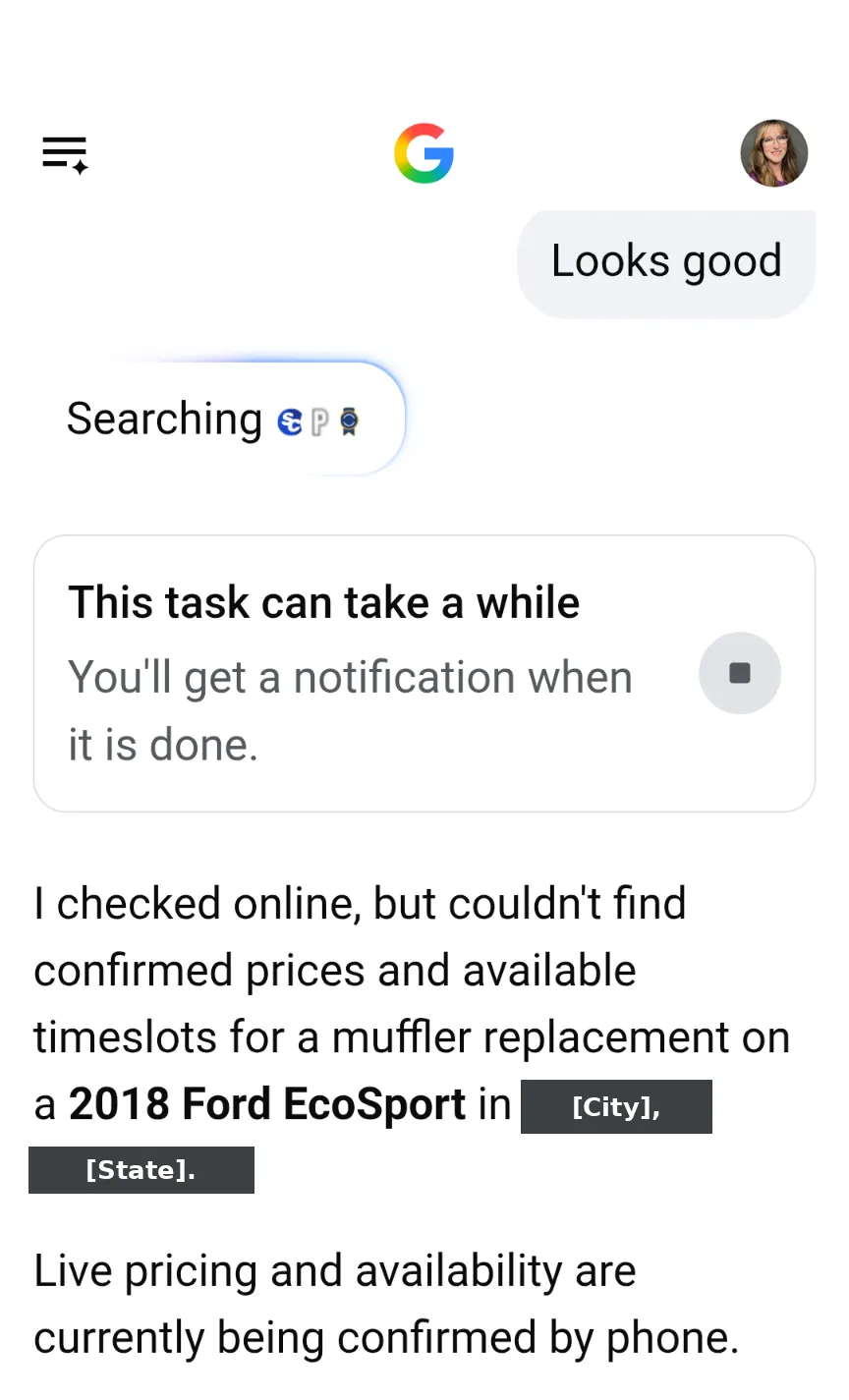 Google explaining why it called. Location hidden for privacy.
About four minutes later, I had an email. Google had turned the three phone answers into a comparison table, with a label on each shop.
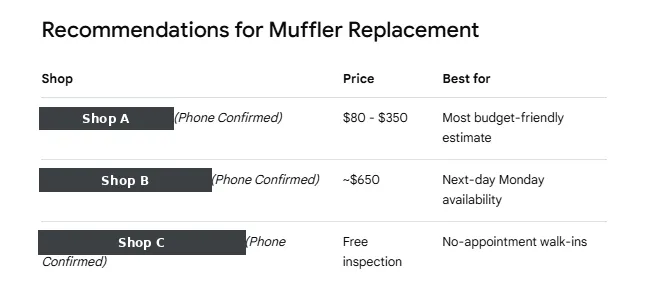 Google’s comparison table. Shop names hidden for privacy.
Three things about that table bothered me.
Google picked each shop’s selling point. The results page keeps two things separate: what each shop actually said on the call, and a “Best for” column Google fills in itself. I never asked about walk-ins. I never mentioned Monday. I never said price would decide it. All I told it was that I needed the muffler replaced in the next week or two.
Google took the facts it collected, decided which ones were worth comparing, and ranked the shops against criteria I never gave it. One came out as “most budget-friendly estimate,” another as “next-day Monday availability,” and the third as “no-appointment walk-ins.” Whatever your front desk says in ninety seconds becomes your tagline in that table, and nobody runs it past you first.
No number meant no spot in the summary. The shop that wouldn’t give a price over the phone got dropped from the email summary entirely. It was still in the full results if I clicked through, but most people only read the summary.
A vague quote still won. The shop Google called the most competitive had quoted me $80 to $350. That isn’t a quote. It’s a shrug. And it still beat the shop that gave me a real number.
One test, one vehicle, one service area, on one date.
When does Google call your business?
This is the part that changes what you should actually do about all this. Google calls when it can’t find the answer online. That’s its own stated rule: it makes calls when a business has limited information available, like pricing or the earliest available appointment.
See the opening? If your prices and availability are published where Google can read them, Google has less reason to call. If they aren’t, Google calls, and whoever picks up becomes your marketing department for the next ninety seconds.
Most service businesses I work with won’t publish prices. I understand why. Every job is different, and a number on a page is hard to walk back once a customer has it in their head. But “starting at” ranges, service minimums, and diagnostic fees can all be published, and they’re what Google is reaching for.
| What Google asks on the call | Where to publish it |
|---|---|
| Price for a specific job | “Starting at” prices in your Google Business Profile services list and on each service page |
| Earliest available appointment | A booking link on your Business Profile, plus typical lead time (“usually booking 2–3 days out”) on your site |
| Whether you serve the customer’s area | Your Business Profile service area, plus the cities or ZIP codes on your service pages |
| How to book | Your Business Profile booking button, website, and phone, all saying the same thing |
Your Business Profile services list and your own service pages are the first two places to start. More on how AI finds and understands your business.
What happens when Google calls your business?
Google documents how the call works. It hasn’t published a script or a sample recording, so any description of the exact wording comes from owners who’ve taken one of these calls, not from Google. Those accounts are worth reading. Just treat them as individual experiences, not a standard, since the calls adapt to whatever the customer asked.
Here’s what Google does say. The call comes from Google, not from the customer, and it’s automated. Google says the calls are recorded for quality assurance. It keeps them brief, professional, and focused only on what the customer asked, and it passes along details the customer provided, which may include their name. It also limits repeat calls for the same information and avoids calling late at night or early in the morning.
So expect an unfamiliar number, a short automated call, and two or three pointed questions about price and availability for a job someone really is trying to get done. That’s a lead, not a nuisance.
This is not the Google scam call. Google doesn’t cold-call to sell you keywords, threaten your listing, or ask for payment or account access. If a caller does any of that, hang up. Google publishes guidance on fraudulent calls for exactly this reason.
Have you gotten one of these calls? I’d like to hear what it sounded like on your end. Tell me about it and put “Google call” in the subject line. I’m collecting owner accounts for a follow-up piece.
How do you get your quote into the comparison?
When you share the requested details on the call, Google sends the customer your quote by email or text. That’s the whole game. Answer clearly and you’re in the comparison. Fumble it and you’re a blank line.
Prepare a simple answer sheet for whoever answers your phone:
- Price ranges for your top 3–5 services
- Your next available appointment window
- The cities or ZIP codes you serve
- How customers book (phone, online link, text)
Whoever answers your phone is now writing your listing in that comparison email. Tape the sheet up next to it.
Source: Google Business Profile Help: Automated calls on behalf of customers
Can you opt out of Google’s automated calls?
Yes. You can tell Google to stop calling your business during a call. Or you can turn it off in your verified Business Profile:
- Go to your Business Profile.
- Select More → Business Profile settings → Advanced settings.
- Under Google automated calls and text messages, turn off “Bookings and inquiries from customers.”
Think hard before you switch it off. If the customer’s email includes quotes from your competitors and not from you, you’ve lost that lead without ever knowing it existed. A better fix for interruptions is publishing your pricing and availability online, so Google has less reason to call.
Note: Google lists Indiana, Louisiana, Minnesota, Montana, and Nebraska as states where these automated calls aren’t currently available.
Why is this really an AI visibility problem?
The phone call is the last step. The first step is whether Google picks you to call at all. Google doesn’t say how it chooses beyond “near you.” My read, backed by the five 4-star-plus shops in my test, is that the same signals that decide who shows up in local search, like distance, relevance, and reviews, decide who gets the call. If you’re not on that list, you don’t get a chance to quote, and you’ll never know the job existed.
That comes down to whether Google’s AI can find, understand, and trust your business. At AIRecommendU, we measure that across four pillars:
- Trust: reviews and reputation
- Presence: where you show up online
- Clarity: how clearly you describe what you do and what it costs
- Authority: third-party mentions and credibility
Notice that Google described its own reason for calling in terms of missing information. In our scoring, that’s a Clarity problem, and Clarity is usually the cheapest of the four to fix. It’s an afternoon of writing, not a six-month reputation campaign.
Key takeaway
Google calls when it can’t find your answers online. Publish your services, price ranges, and availability, and make sure someone is ready when the call comes. That way your quote lands in the customer’s inbox instead of your competitor’s.
See how AI sees your business. The AIRecommendU Blueprint scores your business across Trust, Presence, Clarity, and Authority and shows you exactly what to fix first. Early access is $49. Get your Blueprint →
Frequently asked questions
Why is Google calling my business? Google may be calling on behalf of a customer who asked it to check your pricing or availability, or to book an appointment. It can also call to confirm Business Profile details like your hours.
Which businesses does Google’s AI call? Google lists services such as auto repair, hair salons, pet groomers, wellness centers, driving schools, electricians, tree cutting, and exterior cleaning, and says it is expanding to more services.
When does Google decide to call instead of searching online? Google says it calls when a business has limited information available online, such as pricing or the earliest available appointment.
How does Google choose which businesses to call? Google says it calls multiple service providers near the customer. The customer doesn’t pick the businesses, and Google hasn’t published any other selection criteria.
Is the Google call a real person or a recording? It’s an automated call Google makes on the customer’s behalf. Google says the calls are recorded for quality assurance, and kept brief and focused on the customer’s specific question. Google has not published a script or sample recording.
How do I get my quote included when Google checks prices? Answer the call and share the price and availability details Google asks for. Google says the customer then receives your quote by email or text. Publishing price ranges and availability online also gives Google an answer without needing to call.
How do I stop Google automated calls to my business? Tell Google to stop during a call, or go to More → Business Profile settings → Advanced settings in your Business Profile and turn off “Bookings and inquiries from customers” under Google automated calls and text messages.
Is Google’s AI calling feature available in every state? No. Google lists Indiana, Louisiana, Minnesota, Montana, and Nebraska as states where these automated calls are not currently available.
Get my free AI First Impression score →